Showing posts with label rom. Show all posts
Showing posts with label rom. Show all posts
Saturday, April 22, 2017
REDMI 1S CM13™ MARSHMALLOW CUSTOM ROM R22 BASED ON 6 0 1 BY ARMANI DEVS 16 03 2016 NEW
REDMI 1S CM13™ MARSHMALLOW CUSTOM ROM R22 BASED ON 6 0 1 BY ARMANI DEVS 16 03 2016 NEW

CM13™ MARSHMALLOW CUSTOM ROM FOR REDMI 1S BASED ON 6.0.1 BY ARMANI DEVS
File Name: cm-13.0-20160316-UNOFFICIAL-armani.zip
File Size: 292MB
Developer: #fefifofum
CM Version: CM13
Android Version: 6.0.1
CREDITS: #fefifofum #Kra1o5 (armani devs)
Unofficial CyanogenMod 13 ROM for Redmi 1s is OUT !!!
and it is based on Cyanogenmod the Android Open Source Project with extra contributions from many people within the Android community. It can be used without any need to have any Google application installed. Linked below is a package that has come from another Android project that restore the Google parts. CyanogenMod does still include various hardware-specific code, which is also slowly being open-sourced anyway.You can also view the Changelog for a full list of changes & features.
CHANGELOG:
R22 [2016/03/16]:
- Changes in power_profiles.xml
- Small fixes in battery modes
- WiFi: use CAF paths and symlinks
- Disable offload hw audio effects
- Kernel: enable NEON (thanks @onano)
- Fixes in ft5x06 touchscreen driver (thanks @onano)
- Changes in battery modes
- Revert audio and media changes
- Disable basic dexpreopt
- Rebase kernel to LA.BF.1.1.3_rb1.10
- Changes in audio and media conf files
FOR DETAILED CHANGELOG : REFER BELOW LINK
CM13 R22 CHANGELOG
SCREENSHOTS
INSTRUCTIONS
1. REBOOT TO CUSTOM RECOVERY
(NOTE : TWRP V2.8.7.0 RECOMMENDED)
(NOTE : TWRP V2.8.7.0 RECOMMENDED)
[POWER OFF -> PRESS POWER + VOLUME UP BUTTON TOGETHER]
2. TAKE BACKUP ON EXTERNAL SDCARD [RECOMMENDED]
3. WIPE DATA/SYSTEM/CACHE/DALVIK
3. WIPE DATA/SYSTEM/CACHE/DALVIK
4. SELECT "INSTALL" & CHOOSE YOUR DOWNLOADED "CM13 ROM.ZIP"
5. SWIPE TO FLASH
6. REBOOT & ENJOY !!!
DOWNLOAD LINKS:
DIRECT DOWNLOAD
GOOGLE DRIVE
MEDIAFIRE
DEV-HOST
USERSCLOUD
GAPPS
GAPPS DOWNLOAD
POST YOUR QUESTIONS IN THE COMMENT BOX
GAPPS
GAPPS DOWNLOAD
POST YOUR QUESTIONS IN THE COMMENT BOX
ALSO READ>>> SONY XPERIA WALKMAN, ALBUM, MOVIES FOR NON ROOTED DEVICES 5.0+
Available link for download

Monday, April 3, 2017
REDMI 1S CM12™ LOLLIPOP 5 0 2 ROM LATEST BY SYHOST 31 03 2015
REDMI 1S CM12™ LOLLIPOP 5 0 2 ROM LATEST BY SYHOST 31 03 2015

You can also view the Changelog for a full list of changes & features.
ROM HAS BEEN TESTED:
1, wifi: ok (MAC address fixed)
2. Bluetooth: ok (tested Bluetooth headset, transfer files, Bluetooth sharing networks, etc.)
3, the signal / 3G: ok
4, off charge: ok
5, GPS: ok
6. Camera: ok
7, the display driver (gpu etc.): ok
8, selinux: ok
9, sound driver (mic and speak, etc.): ok
10, a distance sensor: ok
11, the light sensor: ok
12, the direction (triaxial) Sensor: ok
13, the video playback: ok
14. Touch driver: ok
15, OTG: ok
16, WFD (Wireless Display): Unknown (to be tested wfd TV function)
17, mtp usb drives, etc: ok
18,3G Data Sharing: ok (tested usb, wifi, Bluetooth and other shared are ok)
19, shock: ok
20, breathing light: ok (you can set the color and length of breathing, support calls flash)
21, FM radio: ok
ROM BUG LIST:
1. some software compatibility not Android5.0
2015.3.31 Update:
1 , misuse ( to be tested ) when repair call
2 , open the default shielded call recording capabilities, automatic call recording the follow-up can be added . .
INSTRUCTIONS:
1.REBOOT INTO RECOVERY (TWRP )
2.WIPE DATA/CACHE/DALVIK/SYSTEM
3.FLASH ROM.zip & Gapps
4.REBOOT
DOWNLOAD LINK:
MEDIAFIRE
DEV-HOST
DEV-HOST
USERSCLOUD
TUSFILES
BAIDU ( PASS= nb1x)
BAIDU ( PASS= nb1x)
ALSO READ>>[REDMI 1S] MOKEE 5.0.2 ROM [LATEST]
ALSO READ>>[REDMI 1S] CM12™ 5.0.2 ROM BY ARMANI DEVS [LATEST]
Available link for download
Sunday, April 2, 2017
ROM CR DROID ROM BASED ON 5 0 2 LP FIRST RELEASE KERNEL
ROM CR DROID ROM BASED ON 5 0 2 LP FIRST RELEASE KERNEL

Redmi 1s
This is a free AOSP / CyanogenMod Android based ROM bringing a lot of custom features ported from AOSPA, SlimRoms, OmniRom and many others great roms out there crDroid brings what Android have of most advanced in terms of customization and stability.
First time installing crDroid to your redmi 1s , or coming from another ROM:
- Make sure youre running a proper working Recovery (CWM or TWRP)
- Copy GApps and crDroid zip to your internal SDCard
- Boot into Recovery
- Flash crDroid zip
- Flash GApps zip
- Flash SuperSU (not mandatory. We have CyanogenMod su access inside)
- DO A DATA WIPE / FACTORY RESET
- Reboot
- Dont restore Apps using Titanium Backup!
Upgrading from earlier version of crDroid:
- Copy crDroid ZIP to your internal SDCard
- Boot into Recovery
- Flash crDroid zip
- Reboot
ROM LINK:
DEV-HOST
KERNEL
DEV-HOST
ALSO READ>>[REDMI 1S] MOKEE 5.0.2 ROM [LATEST]
ALSO READ>>[REDMI 1S] CM12™ 5.0.2 ROM BY ARMANI DEVS [LATEST]
ALSO READ>>[REDMI 1S] CM12™ 5.0.2 ROM BY SYHOST [LATEST]
Available link for download
Tuesday, February 28, 2017
ROM MOKEE OPEN SOURCE 5 1 LP ROM NIGHTLY LATEST 20 04 2015
ROM MOKEE OPEN SOURCE 5 1 LP ROM NIGHTLY LATEST 20 04 2015
.png)
A small group of people from around the world who are interested in Android launched this project on the 12th of December 2012, and is committed to make this ROM better and better. Like most contributors of open source projects (Omni, CyanogenMod, Slim AOSPA etc), we are doing all these in our free time as our passion.
INSTRUCTIONS:
1.REBOOT INTO RECOVERY (TWRP )
2.WIPE DATA/CACHE/DALVIK/SYSTEM
3.FLASH ROM.zip & Gapps
4.REBOOT
NIGHTLY [20/04/2015]
DOWNLOAD LINKS:
DIRECT DOWNLOAD
GOOGLE DRIVE
MEDIAFIRE
GOOGLE DRIVE
MEDIAFIRE
DEV-HOST
USERSCLOUD
TUSFILES
TUSFILES
ALSO READ>> [REDMI 1S] CM12.1™ LOLLIPOP 5.1 ROM
Available link for download
Monday, February 27, 2017
REDMI 1S MOKEE 5 0 2 LOLLIPOP ROM LATEST 07 04 2015 NIGHTLY RELEASE
REDMI 1S MOKEE 5 0 2 LOLLIPOP ROM LATEST 07 04 2015 NIGHTLY RELEASE

A small group of people from around the world who are interested in Android launched this project on the 12th of December 2012, and is committed to make this ROM better and better. Like most contributors of open source projects (Omni, CyanogenMod, Slim AOSPA etc), we are doing all these in our free time as our passion.
ROM has been tested:
1, wifi: ok (MAC address is not fixed)
2. Bluetooth: ok (tested Bluetooth headset, transfer files, Bluetooth sharing networks, etc.)
3, the signal / 3G: ok
4, off charge: ok
5, GPS: ok
6. Camera: ok
7, the display driver (gpu etc.): ok (Android4.4.4 has been upgraded to version)
8, selinux: ok
9, sound driver (mic and speak, etc.): ok
10, a distance sensor: ok
11, the light sensor: ok
12, the direction (triaxial) Sensor: ok
13, the video playback: ok
14. Touch driver: ok
15, OTG: ok
16, WFD (Wireless Display): Unknown (to be tested wfd TV function)
17, mtp usb drives, etc: ok
18,3G Data Sharing: ok (tested usb, wifi, Bluetooth and other shared are ok)
19, shock: ok
20, breathing light: ok (you can set the color and length of breathing, support calls flash)
21, FM radio: ok
ROM bug:
1. some software compatibility not Android 5.0
INSTRUCTIONS:
1.REBOOT INTO RECOVERY (TWRP )
2.WIPE DATA/CACHE/DALVIK/SYSTEM
3.FLASH ROM.zip & Gapps
4.REBOOT
******************************************************
***NIGHTLY*** [07/04/2015]
******************************************************
******************************************************
DOWNLOAD LINKS:
DIRECT DOWNLOAD
GOOGLE DRIVE
MEDIAFIRE
GOOGLE DRIVE
MEDIAFIRE
DEV-HOST
USERSCLOUD
TUSFILES
TUSFILES
*********************************************************************************
***RELEASE*** [02/04/2015]
******************************************************
DOWNLOAD LINKS:
DIRECT DOWNLOAD
MEDIAFIRE
MEDIAFIRE
DEV-HOST
USERSCLOUD
TUSFILES
TUSFILES
ALSO READ>> [REDMI 1S] CM12.1™ LOLLIPOP 5.1 ROM
Available link for download
Thursday, February 23, 2017
STOCK MOTO X PLAY XT1562 STOCK 6 0 1 MARSHMALLOW ROM FLASHING GUIDE 23 03 2016 OTA
STOCK MOTO X PLAY XT1562 STOCK 6 0 1 MARSHMALLOW ROM FLASHING GUIDE 23 03 2016 OTA

OFFICIAL MOTO X PLAY XT1562 STOCK 6.0.1 MARSHMALLOW ROM
This Tutorial shows how to flash Moto X Play with official Stock Marhsmallow ROM 6.0.1 [NEW]
This Tutorial shows how to flash Moto X Play with official Stock Marhsmallow ROM 6.0.1 [NEW]
CREDITS: #Eshwag Reddy
(For GDrive Mirror Link)
OTA LINKS ALSO ADDED !!!
OTA LINKS ALSO ADDED !!!
PREREQUISITES
1. VERIFY YOUR DEVICE MODEL NUMBER IS XT1562.
2. ENABLE DEVELOPER SETTINGS.
2. ENABLE DEVELOPER SETTINGS.
3. ENABLE USB DEBUGGING AND AND TRUST THE CONNECTION.
4. DOWNLOAD ADB INSTALLER, FASTBOOT, AND ROM.ZIP
5. MAKE SURE THE DEVICE IS FULLY CHARGED.
Step 1: Download Moto X play 6.0.1 Firmware zip, Adb installer and Fastboot Zip from the below download section.
Step 2: Create a New Folder with any name inside C Drive (C:) .

Step 3: Extract Fastboot Zip to the newly created folder inside C: .
Step 4: Extract the Firmware zip inside the same newly created folder.
Step 5: Run Adb Installer application file.
( IMPORTANT: Right Click Adb Installer and select "Run as Administrator" )
Step 6: Activate Developer Setting by tapping Build number 7-times in "About Phone" Section.
Step 7: Connect your Mobile and Enable "USB debugging" from Developer Settings.
Step 8: Trust the connection by checking "Always allow from this computer" when you plug in the device for the first time.
Step 9: Run "reboot.bat" file to boot into Bootloader / Fastboot.
Step 10: After rebooting into Bootloader / Fastboot, Run "flash.bat" file to start flashing the ROM 6.0.1.
Step 11: Wait Till it asks you to "Press Any key to Continue" in command prompt.
Step 12: Reboot the mobile, it takes several minutes to boot the device with a newer version.
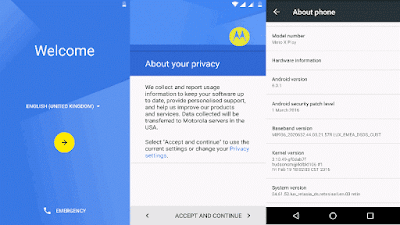
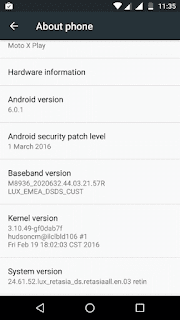
DOWNLOAD ROM(XT1562)
DIRECT DOWNLOAD
GOOGLE DRIVE
FLASH TOOL
ADB INSTALLER
FASTBOOT ZIP
OTA ZIP (385MB)
DRIECT DOWNLOAD
INSTRUCTIONS
- Download & Save the downloaded file to Root of SD Card (External Memory Card)
- Now Restart your device once.
- After restarting go to Settings –> About Phone –> System Updates.
- The device will automatically recognize the Update and user will be prompted to apply the update.
- If Update is not recognized by device try rebooting the device
- Done!!!
ALSO READ>>> SONY XPERIA WALKMAN, ALBUM, MOVIES FOR NON ROOTED DEVICES 5.0+
Available link for download
Subscribe to:
Posts (Atom)